
LED screens: understand the technology and size your wall
An LED screen is not bought by the inch. It is assembled module by module, and three decisions govern everything else: the pixel pitch, the size of the wall and the panel technology. Here is what you need to take them — vocabulary included, calculator to hand.
The principle
An LED screen is not a very large television
The difference fits in one sentence: an LCD screen shows an image behind a backlit panel, whereas an LED screen is made of diodes that emit the light themselves. Everything else follows from that.
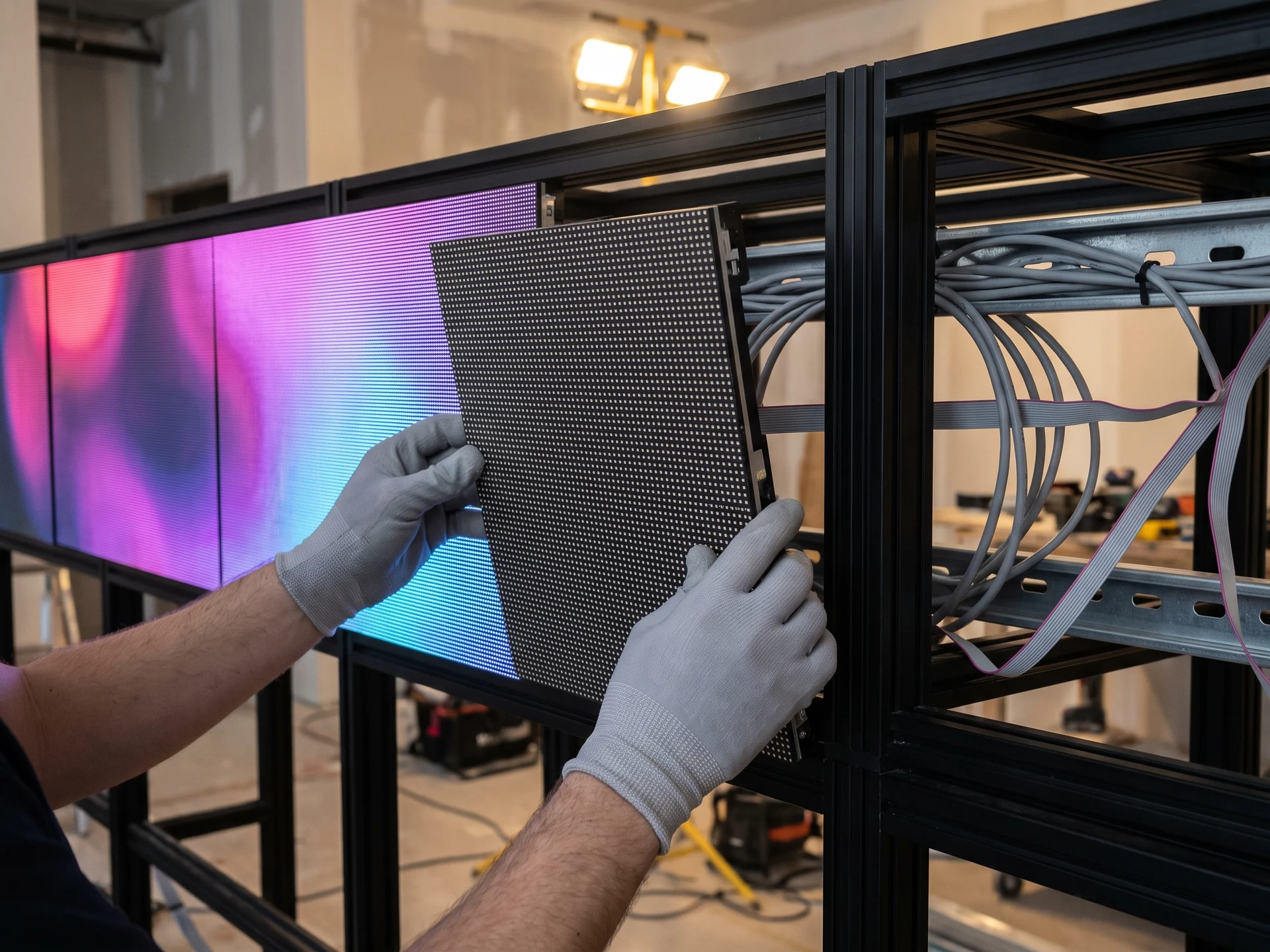
Every point of the image is a light-emitting diode — an LED. These diodes are mounted by the thousand on rectangular modules, often 320 × 160 mm, which in turn clip into frames called cabinets. The wall is built by placing these elements side by side, so its size and its shape are not dictated by a catalogue.
That freedom explains the three qualities specific to LED, and its main constraint.
- ✓No bezels: two neighbouring modules touch, so the image stays continuous — where a video wall of LCD screens keeps a black line at every joint
- ✓Brightness beyond the ordinary: from 600 to 8,000 nits depending on the model, enough to stay legible facing the sun
- ✓Any shape at all: a very long ribbon, a portrait format, a complete perimeter board around a pitch
- ✓The constraint: an unusual resolution, almost never that of a television — and this is what the playback software has to handle
The vocabulary
Six words worth knowing before you ask for a quotation
These terms come up in every data sheet and in every integrator’s proposal. Knowing them saves a good deal of misunderstanding.
Pixel pitch
in millimetres
The distance between the centres of two neighbouring LEDs. A P2.5 spaces its diodes 2.5 mm apart. This is the measurement that decides how sharp the image is, what the panel costs… and from how far away it should be watched.
Module
the basic element
The building block of the wall, typically 320 × 160 mm. Its size sets the step of the build: the final dimensions are always a multiple of the module.
Cabinet
the frame
The aluminium frame that holds several modules, together with its power supply and receiving card. Common formats: 500 × 500 mm indoors, 960 × 960 mm outdoors.
Brightness
in nits (cd/m²)
The amount of light emitted. An office is content with 600 nits; a shop window facing south calls for 2,500 to 5,000, and a building facade for up to 8,000.
Ingress protection
IP20 to IP65
Resistance to dust and water. An outdoor screen rarely goes below IP65 on its front face; indoors, IP20 to IP31 is enough.
Resolution
in pixels
The total number of LEDs in the wall. It follows from the number of modules and the pitch, and it is this figure — not the format of the source — that gives the exact size of the artwork to prepare.
The technologies
SMD, COB, GOB: what the acronyms on data sheets actually mean
An LED panel is distinguished less by its brand than by the way its diodes are mounted. Four families cover almost the whole market, plus two special cases.
| Technology | How it works | Where it excels | Point to watch |
|---|---|---|---|
| SMD (three-in-one) | The red, green and blue diodes sit together in a single package, surface-mounted on the module. | The great majority of walls, from P1.5 to P10, indoors and outdoors alike. | Below 2 mm, the exposed diodes become vulnerable to knocks and to cleaning. |
| COB (chip on board) | The chips are placed straight onto the circuit and then sealed under a continuous layer of resin. | Close-up viewing, below 1.5 mm: studios, meeting rooms, control rooms, foyers where people come near. | A noticeably higher cost than SMD at an equivalent pitch. |
| GOB (glue on board) | A conventional SMD panel, coated afterwards with a protective resin. | Busy places where the screen gets touched: museums, schools, reception areas, sports halls. | A modest premium over bare SMD, for markedly better robustness. |
| DIP (through-hole LEDs) | One separate diode per colour, inserted through the printed circuit board. | Very coarse pitches outdoors, on boards seen from a distance. | A crude image close up, and a technology in clear decline in favour of weatherproof SMD. |
| Transparent LED | Strips of widely spaced diodes, bonded to a pane of glass or hung in front of it. | Shop windows and glazed facades, when the view has to stay clear. | Lower definition and contrast than a solid panel — that is the price of transparency. |
| Mini-LED and micro-LED | Very small chips, which allow pitches below one millimetre. | Control rooms, film sets and the top end of corporate installations. | A budget still reserved for projects where fineness outweighs everything else. |
The tool
Work out the dimensions, the resolution and the technology of your wall
With the vocabulary in place, on to the practical part. Enter the location, the viewing distance available and the size you have in mind: the calculator works out the real wall, module by module, and the exact format of the artwork to prepare.
LED wall calculator
Five settings are enough to obtain the real dimensions of your wall, its exact resolution and the technology suited to your location.
The pixel pitch is the distance between two neighbouring LEDs. The finer it is, the sharper the image stays close up — and the more the panel costs.
An LED wall is assembled module by module: the final dimensions are rounded to the nearest multiple.
Your LED wall
The dimensions, the resolution and the number of modules are exact results. Weight, power draw and brightness are industry orders of magnitude, to be confirmed against the data sheet of the chosen model and during the technical survey.
The rule of thumb
Choosing the pixel pitch: a question of distance, not of budget
The expensive reflex is to ask for the finest pitch available. Yet beyond a certain distance the eye can no longer tell the difference. The trade rule fits in one line: the pitch in millimetres is roughly the minimum viewing distance in metres.
| Pixel pitch | Comfortable viewing from | Typical uses | Usual technology |
|---|---|---|---|
| P0.9 to P1.5 | 1 to 2 m | Meeting room, control room, studio, reception desk | COB or mini-LED |
| P1.8 to P2.5 | 2 to 3 m | Corporate foyer, showroom, shop, branch office | SMD, or GOB in busy areas |
| P2.9 to P3.9 | 3 to 5 m | Superstore, station or airport concourse, deep shop window | SMD |
| P4.8 to P6.7 | 5 to 8 m | Building facade, car park, outdoor totem, sports hall | Weatherproof SMD, IP65 |
| P8 to P10 | 8 to 15 m | Stadium, roadside, very large advertising format | High-brightness SMD |
A P2.5 installed in a foyer where the nearest viewer stands eight metres away costs a great deal more than a P4 — for an image that looks the same. The opposite holds too: a P6 behind a reception desk will show its grid. The calculator above flags both mismatches.
Three settings
The location dictates the panel, far more than the budget
The same pixel pitch gives three different screens depending on where it is installed. Here is what changes in each case.


Two of these cases have a page of their own: the digital window display for catching passers-by, and the transparent LED screen when the window has to stay see-through. For an advertising screen installed in a public space, the legal framework is set out on our DOOH screens page.
The comparison
LED wall or LCD screens: which one for which project?
The question comes up as soon as a large display area is involved. Seven criteria are enough to settle it — and the last one is worth noting: the choice of hardware does not determine the software.
| Criterion | LED wall | Professional LCD screens |
|---|---|---|
| Size and format | Free: the wall is assembled to the dimension you want | Fixed by the catalogue: 43, 55, 75, 86 inches… |
| Continuity of the image | No bezel between two modules | A black line at every joint in a video wall |
| Brightness | 600 to 8,000 nits depending on the model | 350 to 3,500 nits for high-brightness models |
| Close-up viewing | Limited by the pixel pitch chosen | Sharp at any distance, the panel being defined once and for all |
| Outdoor use | Designed for it, with weatherproof cabinets | Possible, but inside a purpose-built ventilated enclosure |
| Budget | Costed by the square metre, and higher | More affordable in small and medium sizes |
| Driving it with EMITY | Identical: same platform, same playlists | Identical: same platform, same playlists |
In practice, LED becomes the answer beyond roughly six square metres, outdoors, and as soon as a format falls outside the ordinary. Below that, one or two professional screens do the same job for a great deal less.
The EMITY answer
Driving an LED wall: what changes from one platform to the next
The panel is chosen, installed and powered. What remains is to send it something — and that is where platforms part company.
Works with every manufacturer
A software company tied to a hardware maker drives only that maker’s screens. EMITY supports every manufacturer: one piece of software whatever the hardware installed, LED panels included.
An existing estate is taken over without changing a single panel, even if it currently runs on a competitor’s software.
The LED format, handled natively
This is the difficulty specific to LED: 858 × 495 px is the standard format of precisely nothing. In E-MANAGER, that resolution is entered in the playback settings of the playlist.
The editor then opens a canvas at the right size, and your artwork reaches the screen with no distortion and no black bars.
Control over video playback
A large LED surface calls for a steady bitrate. The E-BOX range of players is sized for animation and 4K, where an entry-level player stutters.
Master-slave synchronisation keeps several panels in step, without a single frame of drift between them.
No player box when the screen can cope
On latest-generation all in one screens (LG, Samsung…), E-SOFT installs directly in the memory of the screen: no external player to power or to mount.
A player box remains useful when the screen’s processing power or connectivity falls short. Both approaches sit side by side in the same estate.
Schedule rather than supervise
Playback slots are prepared in advance, day by day and screen by screen. Useful for a shop wall, essential for an advertising screen subject to a night-time switch-off.
Broadcast signal has its place too: NDI and IPTV sources, to cut to a live feed at the right moment.
Creating content, at three levels
The built-in EMITY editor composes directly at the format of the wall, reconstructed from the size of the modules — including for a perimeter board around a pitch.
If your teams already use them, the Canva and Adobe Express bridges return the media at the right size. And for professional creative work, our partner La Collab takes over.
Online, with no server to install
The platform runs in a browser. No server to set up, no dedicated workstation to maintain, nothing to open on the company network.
Updates arrive on their own, and an extra screen is connected in a few minutes.
A few minutes to get the hang of it
Changing an image, moving a slot, adding a video: these are done without technical skills and without calling a supplier back.
In practice, that is what decides whether the wall is still alive six months after it was installed.
A suite, not one more piece of software
The LED wall is often only the beginning. The same platform then manages the whole estate, and covers queue management, meeting room booking, the visitor register and live sports scoring.
One contract, one training session, one point of contact if the need grows — the subscription plans cover the lot.
Support
An LED project is rarely carried out alone
Between the structural survey, the choice of panel, the housing and the creation of the artwork, several trades meet. Here is how they fit together around EMITY.
Pekason
A French LED screen designer since 2008, with a design office in Toulouse and more than 500 screens installed across France and Europe. Their teams advise on the type of panel, size the configuration, carry out the technical survey and the housing, then install the wall and provide after-sales support. Their screens are driven by E-MANAGER.
La Collab
A superb LED wall showing a badly framed image is still a badly used LED wall. La Collab puts you in touch with graphic design and audiovisual professionals, to produce content at the exact format of your screen — where the built-in editor reaches its limits.
The EMITY network
EMITY is sold through a network of 130+ certified partners across France and Europe. Each one knows the platform, trains your teams and remains your day-to-day contact. Write to us and we will point you to the one whose coverage and speciality match your project.
Frequently asked questions
Your questions about LED screens
More answers about digital display are waiting in our digital signage FAQ.


